Introducing the Web Inspector
Posted by Timothy Hatcher on Monday, January 16th, 2006 at 10:36 pm
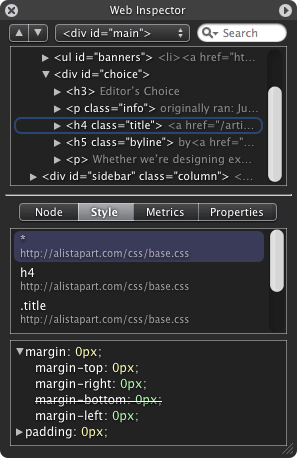
I would like to introduce a new addition to WebKit—the Web Inspector. The Web Inspector lets you browse the live DOM hierarchy in a compact HUD style window, catering to the needs of web developers and WebKit hackers alike.
The Web Inspector highlights the node on the page as it is selected in the hierarchy. You can also search for nodes by node name, id and CSS class name.
One of the unique features of the inspector is the ability to root the DOM hierarchy by double clicking a node to dig deeper. This lets you easily manage large nested pages and only focus on a particular sub-tree with minimal indentation.
Under the Style pane we show all the CSS rules that apply to the focused node. These rules are listed in cascade order with overridden properties striked-out—letting you truly see how cascading stylesheets affect the page layout. All shorthand properties have a disclosure-triangle to show and hide the expanded properties created by the shorthand.
So update your tree or download the nightly and give the new Web Inspector a try. The nightly always has the Web Inspector enabled. However, to enable the inspector for your own build, you will need to type the following in the Terminal once:
defaults write com.apple.Safari \
WebKitDeveloperExtras -bool true
You will then see a new “Inspect Element” contextual menu item on any web page. This will open up the Web Inspector and refocus to the node under your cursor.
We have added a new “Web Inspector” component to Bugzilla to track any issues of feature requests you might have.
I would like to give a big thank you to Dave Hyatt for all the low-level support and design ideas, as well as Geoff Garen and Maciej for helping to brainstorm a great user interface.
January 16th, 2006 at 11:05 pm
This looks really fantastic you guys. The pane looks really useful. Thanks for the development.
However, it feels like, with this new nightly build, I have to be really careful with what I’m doing because it keeps crashing with regular frequency.
-Chasen
January 16th, 2006 at 11:08 pm
Nice work on the Web Inspector Tim. It looks really awesome! I look forward to seeing the Properties and Metrics tabs completed.
Chasen, it would be very helpful if you could file a bug report on the crashes you are experiencing at http://webkit.org/new-bug. If you can find and describe a sequence of actions that crashes the nightly reliably it should make it easier to track down the problem
January 16th, 2006 at 11:25 pm
I’m working on it Mark—the thing is, it’s pretty random. At first it was only crashing when I went to my local testing sites, then I thought it could have been an application/xhtml+xml bug that had slipped in, but now I don’t know what to think. The best I can do, from the report generated after a crash, is that this thread crashed:
0 com.apple.WebCore 0x011eaf98 WebCore::Loader::cancelRequests(WebCore::DocLoader*) + 376
It looks like it’s crashing if a page is loading and that page is “closed” (either actually closed or a new url was requested). If anyone else reports the same thing, I’ll submit a bug. Otherwise, I’ll chalk it up to something on my machine.
-Chasen
January 16th, 2006 at 11:41 pm
[...] — Filed under: General It looks like the WebKit folks just checked in a cool new tool for browsing the DOM. It looks to be a slick and infinitely useful utility for web develope [...]
January 16th, 2006 at 11:53 pm
[...] Safari ã?®ã‚³ã‚¢ã?§ã?‚ã‚‹ WebKit ã?« HUD スタイルã?®æ–°ã?—ã?„インスペクタã?Œæ?載ã?•れã?¾ã?—ã?Ÿã€‚ç„¡é§„ã?«ã‚«ãƒƒã‚³ã‚¤ã‚¤ã€‚ WebKit Nightly Builds [...]
January 17th, 2006 at 12:17 am
Chasen, there is a bug report on that crash at http://bugzilla.opendarwin.org/show_bug.cgi?id=6605. If you can find a set of steps that reliably causes the crash, please do add them to that bug. Thanks
January 17th, 2006 at 12:45 am
[...] mind. It scripts launching Safari by tricking it to load the new webkit. Oh well. Update Develeopers Blog – A description of Web Inspector from the mouth of the creator. [...]
January 17th, 2006 at 12:49 am
The wonderful Mitz Pettel tracked down the cause of bug 6605 and the fix has been landed. I have uploaded a new nightly build (WebKit-SVN-r12147.dmg) which has the fix included, so please download the latest one if you are experiencing the crashes Chasen mentioned.
January 17th, 2006 at 1:59 am
Web inspecteur pour Safari
La dernière nightly build de Safari ajoute une nouvelle fonctionnalité pour les développeurs, l’inspecteur web. Cet inspecteur permet de parcourir la hiérarchie DOM d’une page, élément par élément, et de contrôler le contenu dR…
January 17th, 2006 at 2:22 am
Very handy. It would be nice to see ‘Node’ and ‘Style’ at once.
January 17th, 2006 at 3:31 am
[...] in the hierarchy. You can also search for nodes by node name, id and CSS class name. (from Surfin’ Safari) Screenshot (click to enlarge): [...]
January 17th, 2006 at 3:59 am
Guys, this is absolutely fantastic. This is one thing I have always missed in Safari. Now I dont have to use Firefox to check the properties of elements on the page. And this is so much better executed than mozilla’s attempt.
I do agree with macmoz though, it would be great to see these two somehow grouped together.
Thanks guys
January 17th, 2006 at 5:53 am
looks sweet!
I find it a bit too transparent, but I guess that is part of Quartz / Cocoa?
Also, the scrolling is choppy (at least on my PPC iMac), and It would be nice to see code (Markup and Content) colouring and indenting.
Keep up the great work with webkit, It’s a web developer’s dream come true!
January 17th, 2006 at 6:06 am
Absolument génial ! Merci à vous tous.
I just registered to say it.
January 17th, 2006 at 6:26 am
WebKit inspector
Just downloaded the latest WebKit nightly build after a new item popped up on my Surfin’ Safari atom feed. Here I learned of a new addition to WebKit, a document/element inspector. It looked pretty swish. I got the nightly down…
January 17th, 2006 at 6:35 am
I often find myself moving from Safari to Firefox to solve a JavaScript bug. One reason for this was the DOM inspector in Firefox, and this actually looks far superior in Safari now. But the other issue is the useless JavaScript errors in Safari. If the JavaScript errors could provide even the most basic information about what went wrong where, I could actually do all my development in Safari and only ever open Firefox for compatibility testing.
January 17th, 2006 at 6:50 am
I agree with everyone else. This is awesome. The interface is much better and more compact than Firefox’s DOM Inspector, which up until now was something I held to be the best out there.
However, the outline list’s scroller desperately needs to recognize scrolling events generated by your mouse wheel/ball or scrolling trackpad. This is the only significant complaint I have for the finished part. Keep up the good work.
January 17th, 2006 at 7:12 am
[...] ow! Whoa!! I like it already! Download the nightly build from http://webkit.opendarwin.org/blog/?p=41 and run the followinf in Terminal. defaults write com.apple.Safari WebKitDeveloperExtras -bool true A [...]
January 17th, 2006 at 7:18 am
Scott, if you enable Safari’s debug menu (http://developer.apple.com/internet/safari/faq.html#anchor14) you can use the JavaScript Console to get information about JavaScript exceptions. Double-clicking an entry in the console will open the source and highlight the relevant line. In earlier release it often reported incorrect URLs or line numbers, but recent releases have had improvements in those areas.
January 17th, 2006 at 7:58 am
Cool! A couple things that are probably already on your radar but I will mention anyway:
1. It would be really cool if you could edit the styles in place, for testing purposes. Similar to the Firefox Web Developer extension.
2. It would be handy if the inspect would show inherited styles for any focused element, in addition to the specific styles that are declared for that node.
January 17th, 2006 at 8:14 am
Someone might clarify this: when a style is striked through, does this mean: it is not apllied by the browser because it is overriden by a later rule(block), or because the browser fails to understand it.
In a quick testing, I see styles striked out, but those styles are applied to the document/node.
Very handy tool, btw, thanks for that. But the text on a dark background is hard to read for my tired old eyes.
January 17th, 2006 at 8:26 am
[...] January 17th, 2006 in development tools, safari Dave Hyatt announced last night that the latest nightly builds of Safari now include a new tool for web d [...]
January 17th, 2006 at 9:37 am
Philippe, styles that have a strike through them are ones that would apply to the node, but are overridden by another rule.
January 17th, 2006 at 1:47 pm
[...] Browsers”> WebKit (the engine that powers Safari) now has a new DOM browser, Web Inspector. You have been able to turn on the debug menu in Safari via: % defaults write com.apple [...]
January 17th, 2006 at 4:57 pm
aha! That’s cool, once can change the css for the inspector…
Just change the background to white and put the opacity up! I wish the whole OS was this customizable!
January 17th, 2006 at 6:57 pm
Don’t know if these are bugs, b/c I don’t know the design, but:
Web Inspector should not show up in Safari History
Web Inspector should not allow the contextual menu to inspect web inspector
Also, I’m hunting down a reduction of a crash revolving around changing tabs with the inspector open. It’s in Svn 12148, so I don’t think it’s the same bug that is mentioned above.
January 17th, 2006 at 7:18 pm
Ive just started using MODI in firefox, as I couldnt bear the DOM inspector.
MODI reverses the control scheme, instead of drilling down through a DOM tree and having it highlight page elements, you mouse over a page element and its DOM tree displayed. It also shows handy stuff about classes etc.
URL is slayeroffice.com/tools/modi/v2.0/modi_help.html , it is used as a bookmarklet so you can easily run it against any page.
It would be nice to see the Web Inspector support this inverted scheme, I find it much more convenient.
January 17th, 2006 at 9:35 pm
WebKit nightlies and the Web Inspector
Holy crap — how did I never know about the nightly WebKit builds? (For those of you whose inner geek isn’t as sadly web-centric as mine, WebKit is the framework on which Apple’s Safari web browser is built, and the…
January 17th, 2006 at 11:12 pm
Michael, thanks for the bug reports on the Web Inspector. I have managed to reproduce both of the crashes that you reported, so hopefully they will be fixed in the near future
January 18th, 2006 at 6:55 am
@ Mark Rowe, about that strike-through thing. Thanks for the explanation. I think I have a little bug then…
.
This test-case: http:/dev.l-c-n.com/css3-selectors/namespaces.php, there is an h5 tag with a span inside (green back, white type). The webkit inspector reports the background-color with a strike-through, although the style is applied, and there is nothing that overrides it.
January 18th, 2006 at 6:56 am
@ Mark Rowe, about that strike-through thing. Thanks for the explanation. I think I have a little bug then…
.
This test-case: http://dev.l-c-n.com/css3-selectors/namespaces.php, there is an h5 tag with a span inside (green back, white type). The webkit inspector reports the background-color with a strike-through, although the style is applied, and there is nothing that overrides it.
January 18th, 2006 at 7:09 am
Very nice. Thank you.
We’ll be able to edit the styles in a future release via “properties”, right?
The strike through is a good feature.
It is fun to inspect the inspector. You are importing a “inspector.css” file, wait … so I can change the opacity and the colors in
#body {
background-color: rgba(64,64,64,0.97);
color: rgb(240,240,240);
}
What a lovely tool.
January 18th, 2006 at 7:39 am
Mark,
happy to help, sorry I couldn’t nail the first one down to a discrete set of steps, but I think it may be a really slow race condition around the expire.
I do think my two defects are related at the design level, if not the failure level.
Here are some design questions about how the tool should perform:
1: What should the Inspector do if the inspected element isn’t on the foremost tab of a window?
2: What should the Inspector do if the inspected element isn’t in the foremost window?
3: What should the Inspector do if new web content has been loaded into the window/tab that it was referencing?
4: What should the Inspector do if the window/tab it was referencing has closed?
What I’d expect is that it knows the window/tab it’s referencing and highlights the data there (1 and 2) and that it doesn’t try to highlight in 3 and 4. Possibly on #3, it should ask if you want to refresh.
It might be necessary (or useful) to expand the top of the tree from <document><html> to <window><tab><document><html> . It might be useful to have it switch to the window/tab when you select an element in the inspector (maybe, not sure about the HI guidelines on that).
I didn’t replace the system framework, so I don’t know if it causes any freakiness (or is even available) in other webkit using apps (e.g. Dashboard).
January 18th, 2006 at 8:27 am
Looks beautiful guys, excellent work! One thing that always urks me about Firefox’s DOM inspector was that if I had to reload the page, I would have to drill down again into the DOM to get back to the element I changed. It would be nice if you can mark it to lock to that element on a refresh
Also, what are We / Apple calling this new UI that they are using Everywhere? I know Aqua, I know Brushed Metal (although not official). Is there a name for this white on black transparent UI? cause I love it.
January 18th, 2006 at 10:25 am
Great job, guys. Lags occasionally, but handy nonetheless.
Another slightly more robust tool along these lines is Xyle Scope. I was introduced to this a few weeks ago and it has become a regular part of my development efforts. It’s built on top of WebKit:
http://www.culturedcode.com/xyle/inside.html
No, I don’t work for them, I just like the tool.
January 18th, 2006 at 8:07 pm
[...] ngine that powers Safari on Mac OS X and other HTML-viewing Mac programs) have released an insanely great tool to assist web development. Go check it out and [...]
January 18th, 2006 at 8:49 pm
Web Inspector
Surfin’ Safari †Blog Archive †Introduc…
January 18th, 2006 at 9:20 pm
Philippe, thanks for the example. I agree that what the Web Inspector displays in that case is misleading, though not entirely inaccurate. It shows that the background-color will be overridden by that specified in the ::selection declaration in base1.css. It’s misleading because the ::selection rules are not applied unless there is a selection active. I would appreciate if you could file a bug with a reduced test case demonstrating this so a clearer means of communicating the “overriding” of rules in this scenario can be found.
A secondary comment is that the page you referenced claims to test CSS namespace selectors, and yet it is served up as text/html. Namespaces are a feature of XML and as such are not applicable in “plain” HTML documents. If you update your page to serve the example as an XHTML Content-Type it will have greater chance of working in browsers.
January 18th, 2006 at 11:34 pm
Pseudo elements really shouldnt be matching. This is a bug in the inspector right now.
January 18th, 2006 at 11:43 pm
Mark, I’ll file a bug with testcases in a moment.
Note that the page in my example is correctly served as application/xhtml+xml to Webkit based browsers, Gecko and Opera (using some php magic, setting Content-Type headers), and to the W3C validator.
January 18th, 2006 at 11:47 pm
Phillippe: I checked the headers of your page using ‘curl -I’ which your browser-sniffing obviously doesn’t understand. Apologies for the confusion
January 19th, 2006 at 12:05 am
I filed bug 6666 for that ::selection problem.
January 19th, 2006 at 3:37 pm
[...] e are some gems in the latest WebKit that you’ll enjoy. My two favorite are the new Web Inspector feature and SVG support. Below, you can see both of these features in action on my Mint in [...]
January 21st, 2006 at 2:13 am
[...] culo.us, Dojo, DWR, and Ajax.NET. Ajax.NET shut down and was incorporated into BorgWorX. Apple introduced a new DOM inspector into WebKit. Rails went 1.0 and introduced .rjs templates. Google [...]
January 21st, 2006 at 2:23 pm
That one just cracked me up! I downloaded the sources to check out how you had made that nice inspector. It used a look and controls that resembles the new inspector in iPhoto, and I badly want to be able to use the same controls. Looking through the project, I couldn’t find a nib file. Instead I found… html and javascript! The inspector’s actually just a page! Way too funny.
Would explain the funky scroll bars and performance…
January 21st, 2006 at 2:29 pm
Don’t be so quick to finger HTML+JS for the performance. The tree control used in the Web Inspector is Objective-C.
January 26th, 2006 at 1:55 am
[...] ri Web Inspector In nightly builds of Safari, a new feature has been introduced; The Web Inspector. It really like the feature that shows all css rules applied to a selected node. I wond [...]
January 27th, 2006 at 3:19 am
Firefox web developer is great, but as far as I’ve found, it only allows live changes to CSS. If you install SafariStand http://hetima.com/safari/stand-e.html it adds a simple menu bar to the show source window that means that you can edit the source of the whole page. If you happen to use inline style sheets (at least for testing purposes), you can get most of the functionality of the FF CSS editor, but with the added bonus of being able to edit the HTML as well.
January 28th, 2006 at 12:59 am
[...] nality is pretty similar to Venkman but the presentation makes a big difference. Woohoo! Safari Web Inspector – I stumbled across Safari Web Inspector a few days ago and though i [...]
January 29th, 2006 at 10:52 pm
Safari gets Web Inspector
Looks hot as hell, but is it as functional as Mozilla’s DOM inspector? Who knows, but if you’re a Safari user, check out their new Web Inspector.
…
February 4th, 2006 at 9:17 pm
[...] ss name. Safari的開發網站 – WebKitæ—¥å‰?為Safari推出一個å??為“Web Inspectorâ€?的新工具,他å?¯ä»¥è®“ç¶²é ?開發人員輕鬆地查閱æ£åœ¨ç€?覽網é ?çš„DOM tree [...]
February 6th, 2006 at 3:09 am
[...] programming, Snippets, web development. Safari Web Inspector // How cool is this – along the same lines as Firefox’s DOM inspector – but fo [...]
February 15th, 2006 at 10:19 pm
[...]
Web Inspector
p=. !/pix/2006/web_inspector.gif! “Web Inspector”:http://webkit.opendarwin.org/blog/?p=41 is a cool feature in Safari that lets you browse the DOM hierarchy of a web page in a compact window. It̵ [...]
February 21st, 2006 at 5:32 pm
[...] minden igaz már egy friss engine működik a böngésződ alatt. Ami engem érdekelt az a Web Inspector része volt a dolognak, CSS / XHTML szerkesztgetésnél jól tud jönni egy ilyen tool az e [...]
February 22nd, 2006 at 3:00 pm
[...] h more Mac like. I’m very excited that the most recent builds of Safari have the new Web Inspector panel. Looks very promising, but it’s not quite there yet. So yes, Camino is a great [...]
March 14th, 2006 at 3:19 am
[...] d under Uncategorized Finally Safari gets some developer usable tools. The Web inspector introduced a little [...]
March 18th, 2006 at 8:32 pm
ultracet by mail
Surfin’ Safari -…
April 7th, 2006 at 9:24 pm
Awesome Web Inspector! When are the metrics and properties tabs going to be available?
April 17th, 2006 at 9:34 am
[...] Surfin’ Safari – Introducing the Web Inspector 18:31 Introducing the Web Inspector spiega come attivare la feature del Web Inspector in WebKit, ovvero Safari. [...]
April 18th, 2006 at 5:44 am
[...] l build of Apple’s Safari and KHTML engine which provides a very nice DOM inspector: Safari/Webkit Web Inspector. Happy debugging!
Posted by Andrew
[...]
May 17th, 2006 at 12:12 pm
[...] across all of the technical books in the Safari library – more than 3500 in all. … Surfin Safari – Blog Archive Introducing the Web Inspector It scripts launching Safari by tricking it [...]
May 29th, 2006 at 12:34 pm
[...] erence library for programmers and IT professionals. The subscription service lets… Surfin Safari – Blog Archive Introducing the Web Inspector It scripts launching Safari by tricking it [...]
June 1st, 2006 at 4:46 pm
[...] las que poder desarrollar y probar nuestros sitios web. Aquà os dejo algunas de ellas: The Web Inspector es una caracterÃstica que presumiblemente estará presente en futuras versiones de Saf [...]
June 4th, 2006 at 11:39 am
[...] o en el proceso de diseño de Safari. Conclusión: Safari puede servir perfectamente para desarrollo web. Antes de que te lances, un consejo: con prudencia. VÃa Hicks Design. Technorati Tags: f [...]
June 14th, 2006 at 12:28 pm
[...] roviding excellent plugins. Some of the useful plugins mentions in this article include: The Web Inspector (mentioned previously on Bluesparc) SafariStand SafariTidy SafariSource WebDevAdditions [...]
June 28th, 2006 at 12:41 am
[...] ebKit application—not just Safari. One of the unique things about Drosera, like the Web Inspector, is that over 90% of it is written in HTML and JavaScript. This is a true testament of what [...]
June 28th, 2006 at 9:57 am
[...] eloper websites – have been even more exciting for them. In January, Apple announced Web Inspector – a slick, integrated inspector for the DOM. Then, word came out that DashCo [...]
July 17th, 2006 at 7:53 am
[...] Drosera “One of the unique things about Drosera, like the Web Inspector, is that over 90% of it is written in HTML and JavaScript. This is a true testament of what [...]
July 21st, 2006 at 4:26 am
[...] 5.4Update to my preferred ftp client. » Google CheckoutAlternative to PayPal » Web InspectorLate with this, but nice WebKit DOM In [...]
August 4th, 2006 at 7:10 am
[...] n of webkit (a.k.a. Safari): http://nightly.webkit.org/builds/ included with webkit is the webkit inspector, which is like firefox’s web development kit, but much cooler. note: you may need [...]
August 24th, 2006 at 4:48 am
[...] ents on the web page, the source as presented to the browser, and the style being applied? Bingo! Thanks to the WebKit team for developing and releasing this, and thanks to Google for helping me find it! Thi [...]
October 4th, 2006 at 10:37 am
[...] ebKit application—not just Safari. One of the unique things about Drosera, like the Web Inspector, is that over 90% of it is written in HTML and JavaScript. This is a true testament of what you can do [...]
October 26th, 2006 at 11:51 pm
[...] al for small mammals, cage birds, and exotics. League City. Surfin Safari – Blog Archive Introducing the Web InspectorI would like to introduce a new addition to WebKit [...]
October 30th, 2006 at 4:53 am
[...] sound safari and listen as the most exotic creatures sing! Surfin Safari – Blog Archive Introducing the Web InspectorI would like to introduce a new addition to WebKit [...]
November 12th, 2006 at 11:35 am
[...] ing the right way … the nightly builds of Safari have a marvelous feature called the web inspector – which shows you exactly which spans and classes every element on your page is being exposed to and h [...]
November 18th, 2006 at 3:00 am
[...] ols to the Mac, and, as a surprise Mac-only bonus, web developers using GWT get to use the Web Inspector, too! You can follow any responses to this entr [...]
December 1st, 2006 at 10:20 am
[...] w up with this one. I just found, on a 6 month old post on jon hicks’ blog, about a year old feature that’s been hiding in the safari/ [...]
December 19th, 2006 at 11:50 pm
[...] en, DIV Borders mit IDs zeigen, HTML validieren und CSS validieren Web Inspector Wenn der DOM Inspector von Firefox groß ist, dann möchte er so werden wie der Web Inspector. Leider [...]
February 9th, 2007 at 10:15 am
[...] o.
(and yeah, what you see in the pic is the Web Inspector inspecting itself. Apparently, it’s written mostly in HTML and JS. Cool!
Tags: development | web | mac
Permalink |
[...]
February 18th, 2007 at 3:00 pm
[...] he horribly, horribly non-compliant HTML we had might’ve been a problem). I like the Web Inspector that’s in the nightly builds of WebKit, it’s being able to tweak the CSS from within the w [...]
May 8th, 2007 at 10:33 am
[...] taka sama wtyczka co w Fx) i kolorowanie kodu. Poza tym razem z WebKit’em dostajemy Web Inspector‘a, który tak samo jak Inquestor jest piÄ™kny i wymiata. DziÄ™ki niemu możemy w Å‚atwy sposób [...]
May 31st, 2007 at 6:31 am
[...] nightly builds of Webkit, the browser engine behind Safari. It’s a bit of a pain to configure Web Inspector but what you get are some fairly handy tools for debugging and working with your HTML. The [...]
June 11th, 2007 at 2:39 pm
[...] increase in render speed of the webkit engine one tiny little feauture did catch my attention. The web inspector seems to be around for some time now. Still, it appears pretty useful to me as a part time [...]
June 13th, 2007 at 6:57 am
[...] up how to enable it and found that it was first released in one of the nightly builds of webkt (source) and it needed to be enabled with a Terminal command. I didn’t try it out but was wondering if that [...]
June 14th, 2007 at 1:52 am
[...] algo asà como un explorador del DOM + CSS, pero para usarlo antes tendrás que activarlo, por aquà te dicen cómo hacerlo. Archivado en: css Firefox internet Mac OS X [...]
June 18th, 2007 at 2:28 am
[...] jetzt ist der Safari endgültig mein neuer Lieblingsbrowser. Ich hab den Web Inspector entdeckt. Für jemanden der viel Seiten schreibt ein Traum-Tool. Einfach rechte Maustaste auf [...]
August 1st, 2007 at 8:15 am
[...] of interest for those out of the loop like me is the Web Inspector… [...]
November 3rd, 2007 at 12:34 pm
[...] Mac OS X 10.5 Leopard ships with Safari 3.0.4 (5523.10) installed. Perfect for downloading Firefox. Kidding aside it’s fast and sleek. Nice additions include the ability to resize a text area on a form (Firefox extension will do the same). Also new (and very handy) is Web Inspector. [...]